Today's Checks
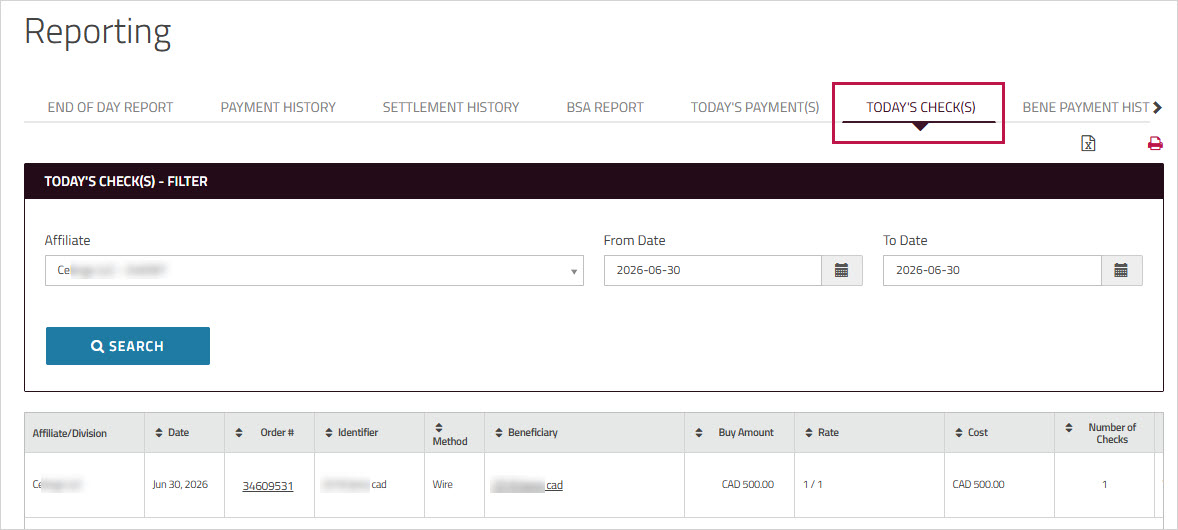
The report displays all processed within the selected date range, improving daily reconciliation. By default, the report shows transactions processed on the current day.
Note: This is a custom report - only clients who are enabled for this report will see it.
To generate the report
- On , click, and then click .
Alternatively, in the section on the Home page, click . - The field is displayed only if your company has one or more divisions or affiliates.
- Enter the period and
click .
The transactions that meet the entered criteria are displayed in the grid. - In the column, you can click a number to view the confirmation for that order.
-
On the confirmation, click the icons at the top of the page to print or save the confirmation details as a PDF.
-
Click the name in the column to view a summary of the beneficiary's information. To close the summary view, click the beside the beneficiary's name or click anywhere on the page.
-
Click the icons at the top of the page to export the report to an Excel file or save it as a PDF.